 Web Authoring - unit 57
 |
 |
Last updated 9th December 2010
Dreamweaver CS3 supported by Photoshop CS3, Flash CS3
Sessions held in the Mac Room 164 of the Multimedia Department, Totton College, Southampton UK.
Download free fully-working 30 Day trial versions from Adobe (click the 'try' link)
Free open source Web design software for Windows, Mac and Linux is available at http://www.nvu.com
Edexcel BTEC ND course qualification document
Pass | Merit | Distinction criteria
 Introductions and first Web page
Introduction. Setting
up your site. Create first Web page using page properties, the toolbox
and properties inspector. index.htm page. Setting typefaces, font size,
style and colour. (If using MX 2004, 8 or CS3 you can make Dreamweaver use html font sizes of 1-7 by changing preferences>general and unchecking the box for 'use CSS instead of html tags'). Adding a second page and links. Previewing your Web
site in a browser by pressing F12. View
source code in Dreamweaver or the browser - a peek at the html code you
are creating with Dreamweaver.
Add images and rollovers: Learning Objectives
 Adding your own pictures from disc, by scanning or digital photography.
Editing images with Adobe
Photoshop. Optimising and graphic file formats: jpeg, gif and .png.
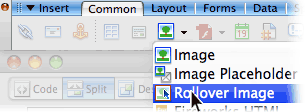 Creating Rollovers
(buttons work the same way).
Creating Rollovers
(buttons work the same way).
History of the internet & WWW. Image maps,
History of the Internet and Sir Tim Berners-Lee, inventor of the WWW - wikipedia entry. An article on Web 2.0 More
on graphics, Image
map hot spots to create links on specific areas of a picture, Dreamweaver writes the JavaScript.
Improving layout control
Introduction to using layers to structure your page layout using the power of CSS. Using tables to improve layout. Table
spacing and padding. Download this transparent spacer.gif to help control table cell width and height.
Spell checking. Designing for your readers using the Window Size pop-up to prepare your site at a suitable size (800 x 600 or 640 x 480 pixels recommended). Rulers and tracing images.
Dynamic HTML
Simple animation within Dreamweaver using DHTML to move layers around or to create simple image slideshows.
Half Term
No Session, you may wish to use the time at home to plan your site or a
simple animation.
Navigation Bars
Graphics for this exercise can be obtained here. Make your navigation bars as Library items (in assets) to make it easy to add or subtract buttons on several pages at once. Example from Stone Arts Ltd. Google Toolbar for Firefox on Mac.
Snow day 2nd Dec 2010
Paper prototyping your Web site
Experiment
with Flash animation
Investigate Flash,
a natural partner (and perhaps rival) to Dreamweaver.
Flash enhanced sites and online
tutorials. Flash animator's victim
Animated gifs, adding
interest and enhancements
Animating a .gif using Adobe Imageready. Adding
sound, QuickTime
movies, Flash
.swf and Shockwave
.dcr animation elements. Web video
formats. Hosting video online - these files can be huge and take up all your web space and bandwidth, so it can be worth getting them hosted on one of these free services.
Photoshop Web Gallery
Creating a Web gallery from a folder of images quickly using Photoshop CS.
Templates,
Library Items and Frames
Templates
and Assets such as Library items help ensure consistency throughout
your site and allow faster site-wide modifications. Frames
may help navigation but we look at some consequential problems and some
alternatives to framesets.
CSS - Cascading Style Sheets
Using external Cascading Style Sheets to master text, control background images and remove underscores from links. Dreamweaver links for CSS including Zen Garden. Free CSS for Dreamweaver MX chapter from the Quickstart guide as an Acrobat pdf file.
Search
engines, META tags, uploading your sites
Help search
engines with META tags to boost the numbers who find your site...
Add links to your own site at wikipedia.org or when leaving comments at an online forum. Making informed decisions about how many of
your target audience can access a feature. Domain
Names. Submit to Web directories.
Uploading and testing your site so far to your own site or the group site:
Accessibility Issues
The semantic Web and CSS - separating content from style. This is a big step towards improving usability for people using alternative browsers and devices such as phones and Palm PDAs. Always use Alt text, which along with proper use of the <h1>Headline tag</h1> will also help with search engine ranking. Most sites improve for ALL users once the needs of some users are considered. BBC Accessibility info. Testing your site with online tools such as WebXACT (previously Bobby). Lynx text only browser. Lynx user guide. Access keys.
Christmas Holidays:
Favicons, browser issues, working on your project site
Favicons - the 16x16 pixel images in the address bar and bookmarked favourites list.
MicroSoft guide, favicon.co.uk and Photoshop plug-in from iconfactory.com Issues with Browser compatibility.
©,
working
on your project site
Copyright © facts. Roger
Dean's copyright warning. Using Photoshop to add a text layer with
reduced opacity to your images to deter online theft and adding a digimarc
from the bottom of the filters menu. On Windows you can get the © symbol by holding down Alt and typing 0169 on the numeric keypad, or Alt g on a Mac. Individual review and assistance
with project development. no right click
Passwords
Password protect part of your site, for 'members only' or to develop your clients' sites: http://www.javascriptkit.com/script/cutindex6.shtml iframes
html
A
little on html - hypertext mark-up language - coding.
working on your site
CSS
revision, especially making interesting rollover effect links quickly.
Half Term no session
Add ads, working on your site
HTML formatted email. working on your site
Sending an email with images, logos and html layout, useful for product announcements, newsletters and special offers.
working on your site & folder
Work
on and then hand in your written documentation, annotated code print outs
and screen captures in an A4 ringbinder marked with your name, e-mail address
and phone number. Web site to be either uploaded
to a live site or submitted on a CD, preferably both. Viewing
and printing the source files from a browser, annotating the code.
Individual assistance will be given.
free online shopping cart systems :
www.oscommerce.org .php and MySQL system which can be run on Macs, Linux and Windows
www.comersus.com .asp system for Windows IIS servers and can be administered from Macs, Linux and Windows. Advanced features require purchase of a range of options.
recommended paid-for e-commerce solution :
http://www.easywebstore.co.uk good telephone support, cheap, £30 set up, £20 per month thereafter, no long contract. Flexible interface, well integrated with online merchant payment systems such as paypal or the better alternatives such as nochex and protx. No limit on web space or traffic.
alternatives include actinic.com, 1and1.com, ecommercetemplates.com and ekmpowershop.com
Looking for follow on courses? Totton College Services to Business also run many relevant courses, call 023 80 874 874 or email: info@servicestobusiness.com
Induction project
Setting up a site, index page, adding additional pages, links
Adding additional pages, images, image optimisation handouts
rollover images, making a .gif button in Photoshop
layout using tables
© Jednet 2000-2018. External links are of course subject to change.
Jednet cannot be held responsible for other people's sites.
If any of these links are broken or lead to unsuitable content please contact
jednet@mac.com
