
10 x two hour sessions from 18:30 - 20:30, starting Monday 16th January 2012 running to 26th March 2012
For further information, contact Jed Gibbs MA by email: jgibbs@totton.ac.uk
Also see course information sheet & enrol at Totton College
Web Design using Adobe Dreamweaver
Intended for anyone who wants to create and maintain Web sites using Windows or Mac computers. Dreamweaver is the industry standard, ideal for anyone wanting to gain employment or design professional sites.
Go straight to this week's information:
Monday 16th January 2012
- Introduction to the course, passwords, fire exits, refectory and parking.
- Setting up your site in Dreamweaver. Site definition walk-through in Dreamweaver CS3 and CS5
- Create first Web page using page properties (Ctrl-J), the toolbox and properties inspector. Your home page should be saved as index.htm and will likely be xhtml (extensible hypertext markup language).
- View source code in Dreamweaver using the 'Split' button at the top left of your window

or in a browser - tweaking the code you are creating with Dreamweaver can be helpful when resolving problems. - Creating more pages, saving them with simple names with no spaces. Adding links.
- Previewing
your Web site in a browser by pressing F12 or choosing File > Preview in Browser > Firefox or click and choose a browser from the little globe symbol to the right of the title box:

- You can add additional browsers by choosing File > Preview in Browser > Edit Browser List...
- Download free fully-working 30 Day trial versions from Adobe (click the 'try' link)
Pugh.co.uk can supply a wide range of software including Dreamweaver CS5:
- an 80% reduced student edition for students on qualifying courses (2 year degree courses or full-time secondary school)
- or teachers and non-qualifying students (this course) can buy an educational edition of Dreamweaver CS5.5 at 50% discount
(check the Adobe collections if you are also interested in Photoshop and Flash). The software is fully working but there are restrictions on 'personal use' rather than for profit and usually no reduced price upgrade path, for example when CS6 is eventually released.
Alternative free open source software for Windows, Mac and Linux:
 BlueGriffon supports HTML5 and CSS3 or nvu for Web design | GIMP alternative to Adobe Photoshop
Monday 23rd January 2012
- Add images to your site from USB stick, disc, by scanning, digital photography, or from the Web. Simple editing with Adobe Photoshop & optimising for the Web (password is 'awd').
- Graphic file formats jpeg, gif ('jif') & png ('ping!').
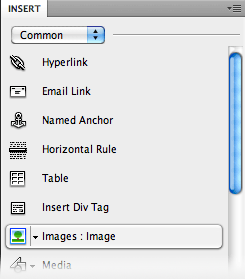 In Dreamweaver insert your image using the tree icon on the 'Common' Insert panel. You may want to set the Border value to zero in the Properties Palette, especially if you link from the image.
 - Download free fully-working 30 Day trial versions from Adobe click the 'try' link to get Photoshop which is also available as an 'extended' version - and do have a look at Photoshop Elements too as it will be sufficient for most people. Photographers should try Photoshop Lightroom. + v4 beta review
- 2 Adobe subscription options for products including Dreamweaver and Photoshop:
One-year plan (Dreamweaver £18.56pcm Photoshop £34.19pcm)
The one-year plan for someone with an ongoing need offers lower monthly payments and requires a one-year commitment (if you cancel early you may get a refund calculated on how much you would have paid on the month-to-month plan, deducted from the annual cost).
 Month-to-month plan (Dreamweaver £28.33pcm Photoshop £47.87pcm)
The month-to-month plan allows you to stop your subscription and then restart it later without reinstalling, within six months. After six months, your account will be deactivated and you will have to purchase a new subscription. - Apple's free iPhoto or £54.99 Aperture (30 day free trial available from bottom right of that linked page) are also good alternatives but Mac-only
- 5 alternatives to Photoshop see the comments below the article for more, including Aviary from worth1000.com
- Free Photoshop 'Idiot's Guides' from MakeUseOf
- Copyright is automatic unless waived. If you'd like people to be able to use your images or music in their own projects (or want to use other's work for your project) consider a Creative Commons License. Free or cheap licensed music from Jamendo.
Digital Millenium Copyright Act. DRM (Digital Rights Management) issues. Peer to peer filesharing rights, wrongs & risks of using the likes of Pirate Bay & BitTorrent. BBC discussion of copyright.
Copyright © facts. Roger Dean's copyright warning. Using Photoshop to add a text layer with reduced opacity to your images to deter online theft and adding a digimarc from the bottom of the Filters menu. Automating this through File>Automate>Web Gallery. On Windows you can get the © symbol by holding down Alt and typing 0169 on the numeric keypad, or Alt g on a Mac. no right click
Monday 30th January 2012
- Working on your personal Web sites. You should be able to add text and images, create new pages and make links between them. Everything you do can be improved or copied and pasted into new layouts later, the main thing is to get some content on your page(s) that we can work with.
- Online video training for Dreamweaver, Photoshop, Flash and pretty much any design software you can think of is available from Adobe, Lynda.com, VTC and Total Training. Most have several free videos for each course as a taster and some have special offers at the moment. For example, Claire found this for 7 free days at Lynda.com
- Mac users may like to try macPro Video.com at this introductory offer of 3 days unlimited access for $1:
Monday 6th February 2012
- Setting up your ftp (file transfer protocol) settings to upload your Websites to www.totton.org using Dreamweaver CS5 (here is the same thing for people with Dreamweaver CS3 at home).
- royalty free photography - stay within copyright laws using stock photography:

Monday 13th February 2012
- Half Term: there is no session this week
Monday 20th February 2012
- Individual review and assistance with project development.
- Image map hot spots to create links on specific areas of a picture. Using a Named Anchor to link within a long page to content lower down (or back to the top).
- GRsites for creating buttons and tiled background textures. Other Dreamweaver links.
- Adding an interactive map to your site by customising Google Maps and then copying a pasting the code into your page using an iFrame. (notes to follow...)
Monday 27th February 2012
- Creating and using

 Favicons
  , the 16x16 pixel images used in the address bar and bookmarked favourites list.
Design a logotype or photographic image that will work as a tiny square, then upload a jpeg version (example jpeg file) and receive a zipped version in favicon.ico format, perhaps with an animated .gif variant for Firefox users (they will see the static .ico version otherwise). You can also create a larger icon that iPad and iPhone users can add to their home screen as a shortcut to your Web site that looks like an App.favicon.co.uk for more information. Favicon ads at CSSPlay If you want to make bigger, scaleable icons for Mac or Windows desktops, consider the iconbuilder plug-in for Photoshop from iconfactory.com (but it is overkill for just creating little favicons).
Monday 5th March 2012
- Creating buttons and rollovers in Adobe Photoshop.
- Using Photoshop's fx Styles, adjusting Bevel & Emboss (Bevel handout download, password is 'awd')
- Animating a gif banner or button using Photoshop's Animation tools
Monday 12th March 2012
Improving presentation and layout:
- Inserting and editing Tables. Padding and Cell Spacing
- Introduction to using AP Div layers to structure your page layout (Absolute Position Division layers are a sub-set of Cascading Style Sheets).
Monday 19th March 2012
 introduction by Joe Jenkins postponed to next week due to other commitments, however there
 iswas an Introduction to WordPress.com session by Martin at Mount Pleasant Media Workshop on Wed 28th for £1. Now fully booked alas BUT a further session has been arranged for Wednesday 18th April 2012- Using Cascading Style Sheets (CSS) for default text, to set link styles and to control background images. Designing for your readers at a suitable size. CSS for positioning or using supplied layouts to speed production.
- understanding-css-positioning-part-1; part 2; part 3
CSS Fundamentals Gallery of CSS Web design ideas at csszengarden.com, cssfury.com & cssloggia.com and

- BlueGriffon supports HTML5 and CSS3 - review, developer's YouTube examples, and Webfonts straight from a menu.
- Adding
 Flash content to Dreamweaver. Issues with iPhones/iPads and the rise of HTML5:
Google html5 guide Google promotes HTML5 Adobe Dreamweaver CS5.5 supporting HTML5
How HTML5 will change the Web 'Flash is dying but it's not Apple killing it'
Monday 26th March 2012
 Adobe Photoshop CS6 free beta released
- WordPress is a useful alternative to Dreamweaver with many Web 2.0 features available without coding. An introduction by Joe Jenkins, who writes themes and has set up several large WordPress sites.
NB Martin's link to MPMW session on WordPress.com
for just £1 on Wednesday 18th April 2012 - enrol online - Additional WordPress introductions at MPMW for £10 on Wednesdays 30th May; 18 July & 21st Nov 2012
- Embedding sound and Flash,
 +
+  video clips or adding QuickTime movies & flvs
- A look at the content of the follow-on Web design course starting 23rd April 2012. Course info sheet.
- Enrol for April 2012's Web Design course at Totton College
- Individual assistance with tidying up your Websites and uploading
- DMoz - The Open Directory. Getting in helps with Google search ranking... tips for submission
- History of the internet and World Wide Web
- Webfonts: the CSS @font-face tag lets you use many more typefaces than the basic 7 listed in Dreamweaver across pcs/Macs and mobile devices such as iPods and iPads.
 is a free opensource javascript library that can enhance your sites. It can be downloaded and then included with your site (so you need to remember to upload it to your server!) or you can link to the library on Google or Microsoft servers. Linking has the advantage of always using the most recent version. interface demo and others, truncatable jQuery tutorials. jQueryui and jQueryMobile
- To make photo-galleries (free for non-commercial sites) jAlbum is available for Mac, Windows and Linux

Are there any resources or materials required?
The software is installed on the college computers. For students wishing to do additional work from home free 30 day trials are available from Adobe. Student rates for the software are available and will be discussed on the course.
Are there any other costs?
Free basic Web hosting will be provided for the duration of the course together with advice on purchasing a domain name (.tk addresses are free, .coms and .co.uk about £6 per year) and ongoing hosting (from free to expensive).
How will I be assessed?
No formal assessment. Help during the sessions & via email support. Totton College course completion certificate.
What are the entry requirements?
No previous experience required but some content may be challenging as the software is for professional-level use.
Contact us
For further information, contact Jed Gibbs MA by email: jgibbs@totton.ac.uk
Tel: (023) 80 874 874 • Fax: (023) 80 874 879
Web: www.totton.ac.uk • Email: info@totton.ac.uk
Dozens of books for CS3, CS4 and CS5 versions of Dreamweaver and Photoshop are available. A free Safari Books Online account will let you compare before buying, or you may decide as I did to subscribe to Safari. Follow a Safari link next to any book in the ad widgit below to get a free 10 day account. (If the slightly temperamental widgit is empty please refresh the page... )
